
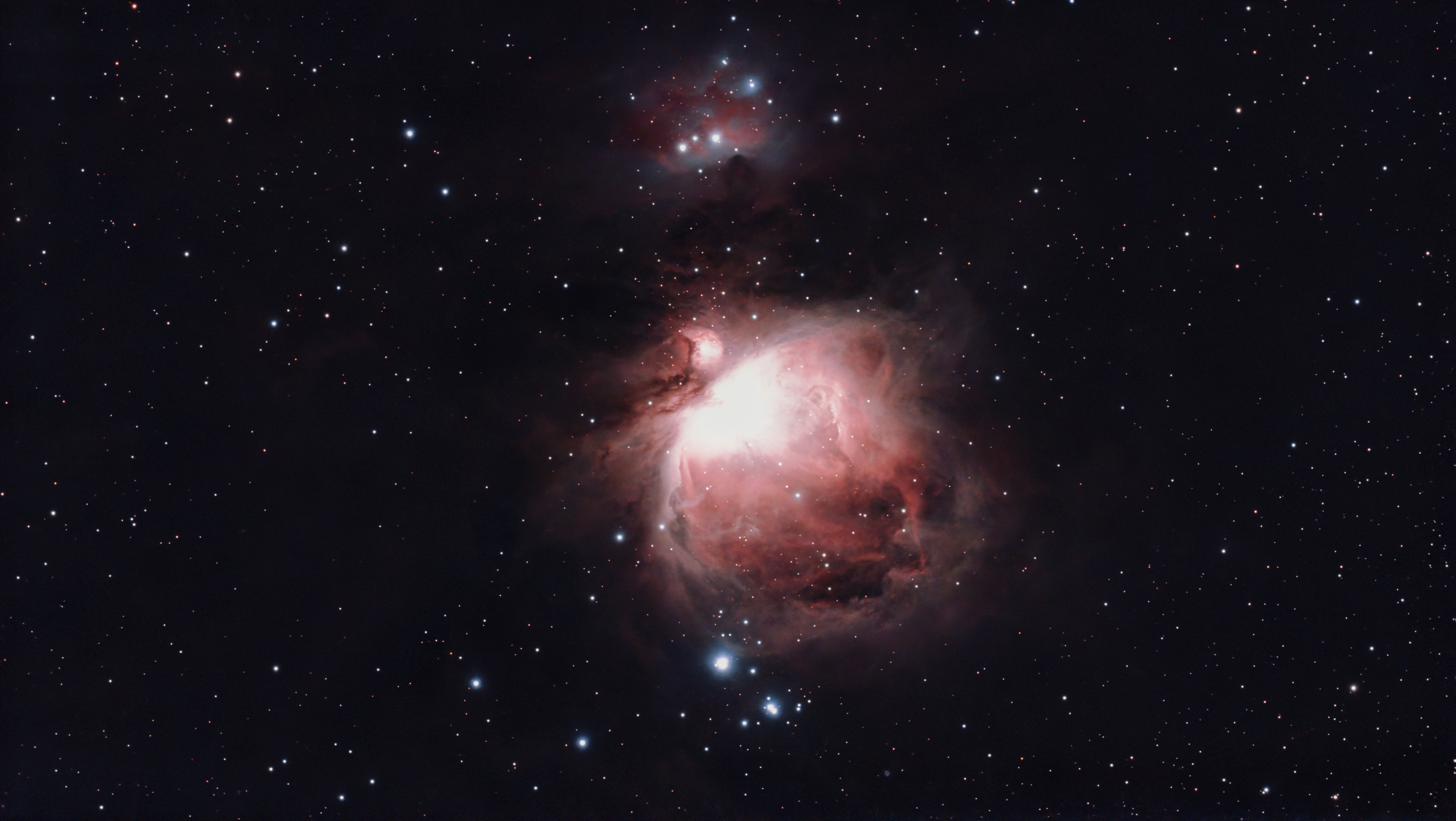
To capture 60-second exposures with the DWARF 3, you must use Guided EQ Mode. By aligning the telescope with the Earth’s celestial pole, you eliminate field rotation and quadruple your light collection compared to standard 15-second Alt-Az tracking.
The DWARF 3 is a capable portable astrophotography instrument, but the full potential of the sensor is only accessible when you move beyond standard Alt-Az tracking. By switching to Equatorial (EQ) Mode, the results shift from short exposures limited by field rotation to deep 60-second subs with round stars across the full frame.

Alt-Az vs EQ Mode: Understanding the Limits
The M16 Eagle Nebula session was a study in Alt-Az mode limitations. While Alt-Az is the quickest way to get up and running, it has physical trade-offs:
- Field Rotation: Tracking follows the sky in a stair-step motion, causing stars in the corners to blur over time.
- Short Exposures: To keep stars round in Alt-Az, sub-exposures must be limited to 15 seconds.
- Thermal Noise: With a summer sensor temperature of 37°C and only 49 frames, the data lacked the depth required for fine detail.

Comparison: 60s EQ Mode vs 15s Alt-Az Mode
| Feature | M42 Orion Nebula | M16 Eagle Nebula |
| Tracking Mode | EQ Mode | Alt-Az |
| Exposure Time | 60 Seconds | 15 Seconds |
| Total Integration | 159 Frames (2.6 hrs) | 49 Frames (12 mins) |
| Gain Setting | 80 | 60 |
| Ambient Temp | 1.1°C (Optimal) | 37°C (Hot) |
Step-by-Step: How to Set Up DWARF 3 EQ Mode
- Level the Tripod: Use the built-in bubble level. A level base is essential for the plate-solving math to work.
- Enable EQ Mode: In the DWARFLAB app, go to Deep Sky, then Settings, then EQ Mode.
- Guided Alignment: The app will instruct you to tilt and rotate the telescope to match your geographic latitude facing north.
- Aim for Precision: The app allows a 4-degree deviation, but for 60-second subs, push for 1.0 degrees or less.
- Wait After GoTo: Allow 30 seconds after the GoTo completes before starting your capture sequence to let tracking stabilize.
The Results at 1.1°C
Taking advantage of a crisp, cold winter night (1.1°C), the DWARF 3 was pushed to its limit. Because the telescope was physically tilted to follow the Earth’s rotation, the stars remained pinpoints throughout the session. After stacking 159 frames, the detail in the gas clouds confirmed the value of EQ mode over Alt-Az.
Alt-Az is adequate for a quick look, but EQ mode is how you unlock the full potential of the DWARF 3 sensor. Mastering this alignment is the single best improvement you can make to your data quality.
What’s Next
Now that you have mastered EQ tracking, make sure your exposure and gain are dialed in. Read the Practical Guide to DWARF 3 Exposure and Gain.
FAQ
How do I set up EQ mode on the DWARF 3?
Level the tripod using the bubble level. In the Dwarflab app go to Deep Sky, then Settings, then EQ Mode. The app guides the tilt and rotation alignment. Push for 1.0 degrees deviation or less for 60-second subs. Wait 30 seconds after GoTo completes before starting capture.
Why does EQ mode allow longer exposures than Alt-Az?
Alt-Az tracking follows the sky in a stair-step motion that causes field rotation over time, blurring stars in the frame corners. EQ mode aligns the rotation axis with Earth’s polar axis, eliminating field rotation and allowing the sensor to track cleanly for the full 60-second maximum.
What precision is needed for EQ mode polar alignment?
The app accepts up to 4 degrees of deviation but for 60-second sub-exposures, 1.0 degree or less is recommended. Greater deviation causes visible star trailing at longer exposures.


Leave a Reply